Git and GitHub
What is version control?
Version control is the process of recording and managing changes to a file or set of files over time so that you can recall specific versions later, if needed.
What do we version control?
The files we’re typically interested in being version controlled are software source code files. However, you can version control almost any type of file.
“In practice, everything that has been created manually should be put in version control, including programs, original field observations, and the source files for papers.”
Best Practices for Scientific Computing, Wilson et al. 2012 (arXiv:1210.0530)
Git and GitHub
What is Git?
Git is a distributed version control system. It was designed to be simple, fast, and fully-distributed, with support for large projects and nonlinear development workflows. Git was originally created in 2005 by Linus Torvalds and other Linux kernel developers when the free use of the proprietary version control system they had been using for kernel development was revoked by its copyright holder.
Private vs Public Repositories
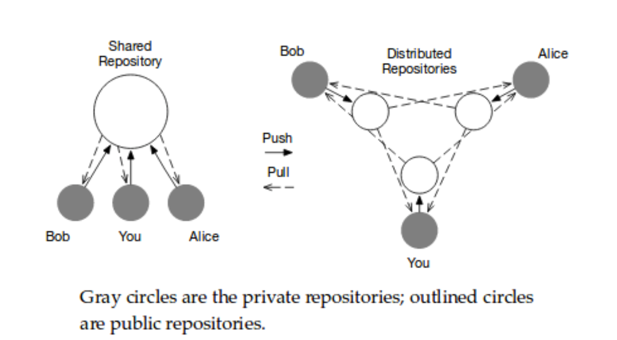
When using Git, each contributor who is sharing changes with others on a project has at least two repositories:
- A private repository is the one that exists on your local computer and is the one you make commits to
- A public repository is the one that you use to share your changes with collaborators
The Git Workflow
-
Update your private repository by
fetching all recent changes committed by your team of collaborators from the shared public repository (or their individual public repositories). -
Make changes and
committhem to your private repository. -
Review your committed changes.
-
Share your new changes with the team by pushing your committed changes back to the team’s shared public repository (or your individual public repository; then submit a pull request from your public repository to the team’s shared public repository).
-
Rinse and repeat.
Getting Started with GitHub

GitHub website: https://github.com
Your GitHub Profile

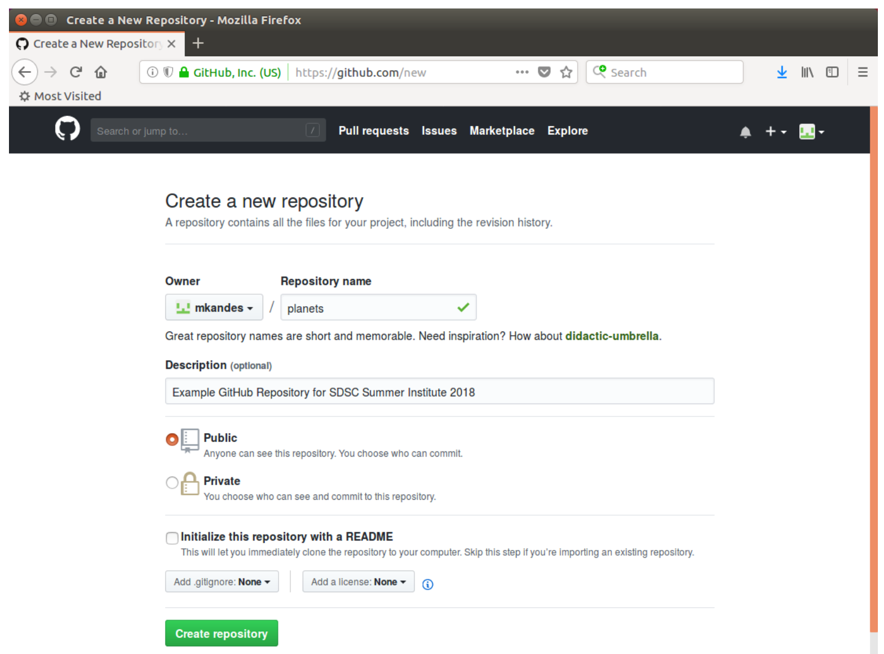
Creating a New GitHub Repository
Your GitHub Repository After the First git push

Using GitHub with Rivanna
I need to push and commit code changes from Rivanna/Afton to my GitHub account. How do I set that up?
You must first generate an ssh key and then copy it to your Git repository. Here are the instructions for generating the ssh key and what to do on your Git page:
-
To generate an ssh key, see the following link: ssh key generation
-
Click on the drop-down menu next to your Git profile picture in the upper right corner; Select Settings; Click on SSH and GPG keys in the left column; Click on the New SSH Key button and follow the directions to upload your ssh key. Make sure that the ssh key is in your authorized_keys file in your .ssh directory on Rivanna/Afton.
-
The next step is to clone the repository using the ssh link. If you have already cloned the repository using the http link and made a number of changes to your files, you won’t want to redo them. Rename the directory that was created when you first cloned the repository. Then, re-clone the repository using the ssh link and copy all of the files you had changed to the new directory. Finally, push those changes back to the repository.
Benefits of Version Control
-
Archiving: You must regularly save the changes you make
-
Reproducibility: Creating a history of saved changes allows you to revert selected files or your entire project back to any previous state in its recorded history.
-
Collaboration: You and a team of contributors can work on a project independently, but share your changes amongst one another as the project takes shape.
-
Accountability: Compare changes, see who last modified something, and who introduced a problem and when
-
Recoverability: Each contributor has their own local, recent copy of the project and its complete history, making it highly unlikely you’ll ever lose a significant portion of the project
References
- Version Control with Git by D. Huang and I. Gonzalez: https://swcarpentry.github.io/git-novice/
- Pragmatic Version Control Using Git by T. Swicegood
- Pro Git by S. Chacon and B. Straub: https://git-scm.com/book/en/v2
- Research Computing Documentation: https://learning.rc.virginia.edu/notes/git-intro/