Rivanna Storage Systems
Rivanna File Systems
The default home directory on Rivanna has 50GB of storage capacity, e.g., /home/gka6a. Each user will have access to 10 TB of temporary storage, e.g., /scratch/gka6a. The /home and /scratch directories are for personal use and not shareable with other users.
Important: /scratch is NOT permanent storage, and files that have not been accessed for more than 90 days will be marked for deletion.
Running Jobs from Scratch
We recommend that you run your jobs out of your /scratch directory for two reasons:
/scratchis on Weka filesystem (a storage system designed specifically for parallel access)/scratchis connected to the compute nodes with Infiniband (a very fast network connection)
We also recommend:
- You keep copies of your programs and data in more permanent locations (e.g., your home directory or leased storage such as
/projector/value) - After your jobs finish, you copy the results to more permanent storage
Leased Storage
| Feature | Research Project Storage | Research Standard Storage |
|---|---|---|
| Quota | 1TB increments | 1TB increments |
| Price | $70 /TB/yr | $45 /TB/yr |
| Snapshots | Daily snapshots for 1 week | No |
| Replication | No | No |
| Backup | No | No |
| Access | Rivanna, Afton, mountable on local workstation | Rivanna, Afton, mountable on local workstation |
| Use cases | Ideal for long term storage of data to be accessed from Rivanna, sharing data within a research group, and running jobs with smaller files. | Budget solution for storing data that can be accessed by a personal computer or Rivanna. It is not recommended to run Slurm jobs against research standard storage unless absolutely necessary. File operations on Research Standard storage are slower than on Rivanna /home, /scratch, or Research Project storage. |
Checking Your Storage
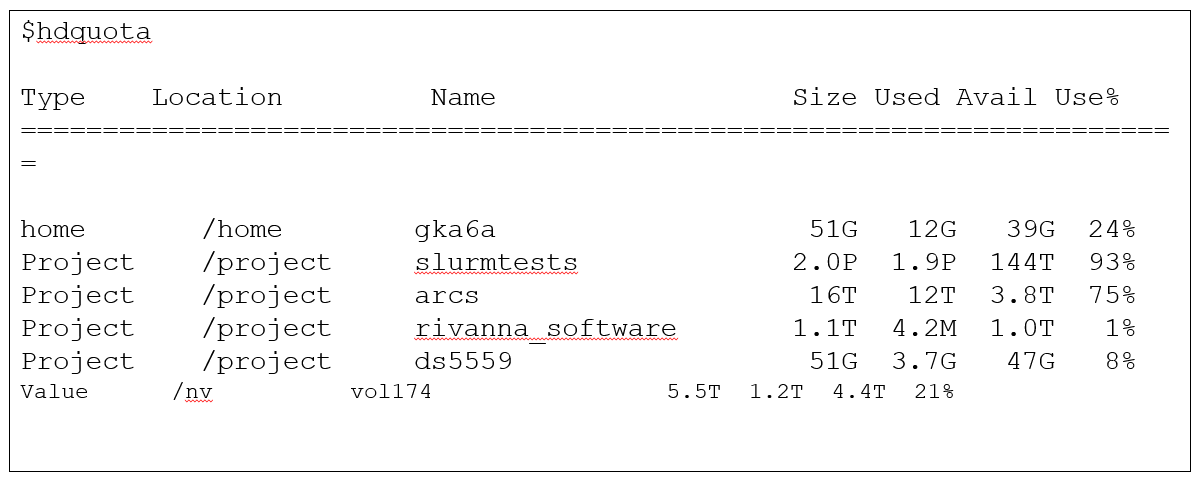
To see how much disk space you have used in your home and scratch directories, open a terminal window and type hdquota at the command-line prompt.
hdquota
Example output:
FAQs
If I’m over my disk quota in either my /home directory or my /scratch directory, how can I determine my disk usage?
You can run the following command from your /home or /scratch directory to see how your disk usage is distributed across subdirectories, and where you need to remove files. You can increase max-depth to go further down the directories.
du . -h --max-depth=1|sort -h -r
If I’m over my file limit in /scratch, how can I determine where all the files are located?
From your /scratch directory, run the following command to determine where you need to remove files.
find . -type f | cut -d/ -f2 | sort | uniq -c